Glossy Cherry: The 3D Font That Pops Off the Page
More Than Just Letters: Understanding the Glossy Cherry Typeface
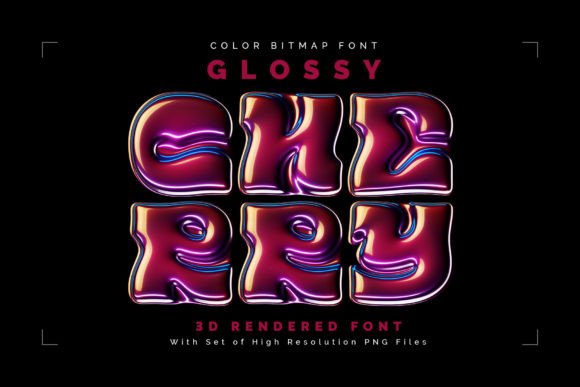
Let's be honest, the world of digital typography can sometimes feel a bit flat. We scroll through endless lists of clean sans serifs and elegant serifs, all perfectly serviceable but rarely sparking that immediate "I need to use this" feeling. Then, something like Glossy Cherry comes along. This isn't just a font; it's a miniature design system, a set of meticulously crafted 3D objects that happen to be letters. Imagine the vibrant, plump look of a fresh cherry berry, with its smooth, light-catching surface and rich color depth. Now, picture that rendered into a full alphabet. That's the core of Glossy Cherry. It’s a color bitmap OpenType-SVG font, meaning the color and 3D effect are baked directly into the font file itself. You install it like any other OTF, but when you type, you get these stunning, pre-rendered glyphs. For designers who need the asset outside of a font-compatible application, a full set of high-resolution PNG files (averaging 12 megapixels) with transparent backgrounds is also included. This gives you incredible flexibility, allowing you to use each letter as a standalone design element in any software.
The Personality and Practical Appeal of a 3D Rendered Font
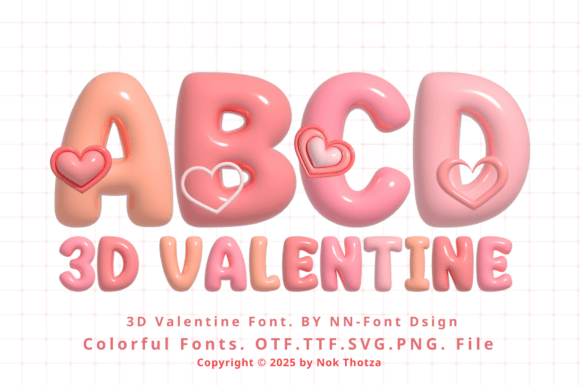
The visual character of Glossy Cherry is unapologetically bold and playful. Its personality is fun, modern, and slightly luxurious—think of the branding for a high-end candy shop, a trendy cosmetics line, or a children's product that doesn't talk down to its audience. The 3D rendering gives it a tangible, tactile quality that flat vector fonts simply can't achieve. This makes it an exceptional display font. Its strength lies in headlines, logos, and short bursts of text where impact is the primary goal. Trying to set a paragraph in Glossy Cherry would be visually overwhelming and a readability nightmare, but used strategically, it commands attention. When considering font pairing, the key is contrast. Pair it with a clean, geometric sans serif font for body text to let the Glossy Cherry headlines truly shine. A simple, minimalist serif font can also work, providing a classic counterbalance to the font's modern, glossy energy. Avoid pairing it with other decorative, script fonts, or handwritten fonts, as that would create visual chaos.
Where Glossy Cherry Truly Shines: Practical Applications
The real value of a creative font like this is in its application. For logo design, especially for brands targeting a youthful, energetic, or creative market, Glossy Cherry can be a game-changer. It instantly communicates a brand identity that is confident, approachable, and visually memorable. Think of a bakery called "The Sweet Spot" or a graphic design studio named "Pixel Pop"—the font itself tells part of the story. In packaging design, it’s perfect for product names on labels for cosmetics, snacks, or artisanal goods, adding a layer of perceived quality and shelf appeal. For social media graphics, where grabbing attention in a fast-scrolling feed is everything, a title card or key phrase set in Glossy Cherry can stop the thumb. It's equally effective for web design hero sections, promotional banners, and call-to-action buttons where you need text to be more than just information—it needs to be an event.
Beyond commercial use, its applications for personal projects are vast. Bloggers and content creators can use it to design standout featured images, YouTube thumbnails, or podcast cover art. For crafters and hobbyists, the included PNG files are a dream. You can easily incorporate the letters into digital scrapbooking, custom t-shirt designs (via print-on-demand services), vinyl decals for planners or mugs, and party invitations. The key is to view each character not just as a letter, but as a small, polished graphic asset. This perspective opens up a world of possibilities in both digital and print mediums, making it a versatile addition to any designer's toolkit of design assets.
A Practical Guide to Using This Premium Font
Before you dive in, a crucial compatibility note: Glossy Cherry is an OpenType-SVG color font. This means it works seamlessly in modern versions of Adobe Photoshop, Illustrator, Inkscape, and Silhouette Studio. However, it is not compatible with Cricut Design Space, as that software does not support the OpenType-SVG format. Always check the character map provided in the screenshots to see exactly which English letters, numbers, and punctuation marks are included. Since it’s a display font, it typically comes in a single weight, focusing on its stylistic impact rather than typographic versatility.
When evaluating if it’s the right fit for your project, ask yourself: Does my project call for a high-impact, playful, or modern aesthetic? Is the text I’m setting limited to short phrases or single words? If yes, it’s likely a great candidate. For editorial design, you might use it for a magazine pull-quote or a chapter title, but never for body copy. In terms of commercial font licensing, always review the specific terms provided by the seller. Typical licenses allow use in end products for sale (like logos or merchandise) but prohibit redistribution of the font files themselves. Testing is simple: type out your intended headline in the font. Does it maintain clarity at the size you’ll use it? Does its color and style complement your overall color palette and brand identity? If it enhances your design without overwhelming it, you’ve likely found a perfect match. Glossy Cherry isn't a tool for every job, but for the right project, it adds a level of polish and personality that’s hard to replicate with conventional modern typography.